What Is a CMS? How WordPress Works (Beginner’s Guide)
Short answer: A CMS (content management system) is software that lets you create, edit and publish website content without writing code. You type into an editor, and the CMS stores your content and displays it on your website in the right design. WordPress is the most popular CMS: it powers 40% of all websites and 58.5% of websites whose CMS is known (W3Techs, October 2026).
Why a CMS matters for digital marketing
Almost every digital marketing task ends on a website. A blog post for SEO, a landing page for Google Ads, an offer page for a social media campaign: all of them need to be published and updated quickly.
Without a CMS, every change would need a developer to edit code. With a CMS, a marketer can publish a new page in minutes. That speed is why knowing a CMS is a basic skill for anyone in digital marketing.
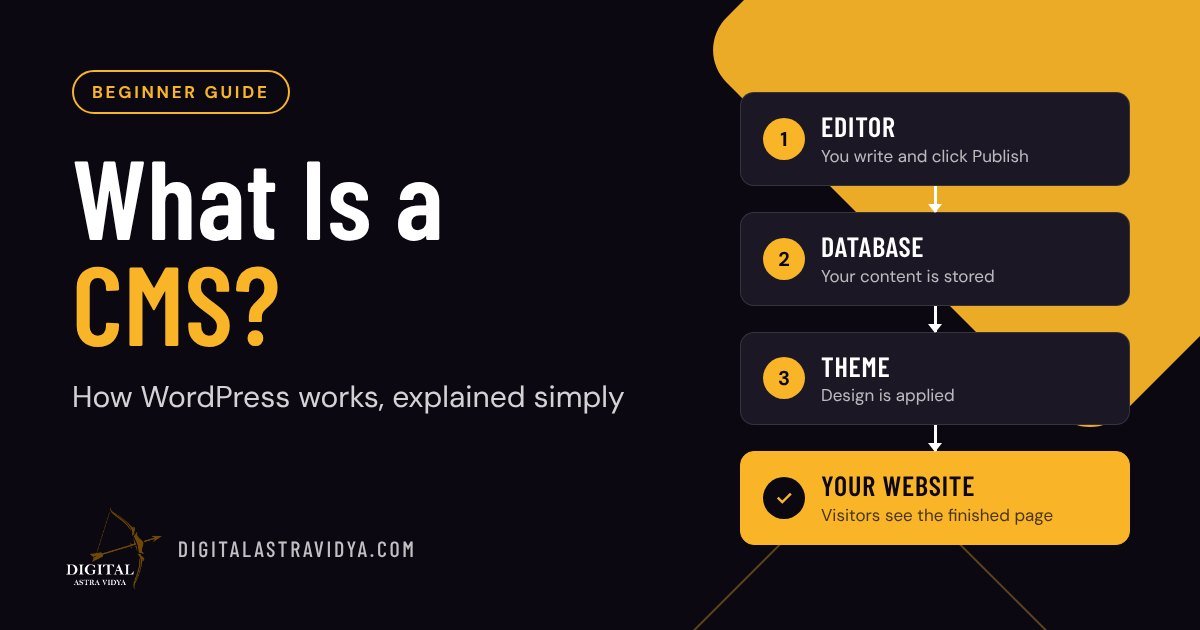
How a CMS works, in three layers
Every CMS separates what you say from how it looks.
- The editor (what you see): a screen where you type text, add images and click Publish.
- The database (where content lives): your words, images and settings are stored in an organised database, not in design files.
- The theme (how it looks): a design template pulls content from the database and shows it to visitors with the right fonts, colours and layout.
Because content and design are separate, you can change your whole website design without retyping a single article.
The main parts of WordPress
- Dashboard: the control panel you see after logging in at /wp-admin.
- Posts: dated articles such as blog posts and news. They have categories, tags and an author.
- Pages: fixed pages such as Home, About and Contact. They are not part of the blog feed.
- Media Library: every image, PDF and video you upload, in one place.
- Categories and tags: labels that group related posts so visitors and Google can find them.
- Themes: the design of the site. You can switch themes without losing content.
- Plugins: add-ons that add features, such as SEO tools, contact forms, caching and backups.
- Users and roles: different people get different powers. An Administrator controls everything; an Editor manages all posts; an Author publishes only their own.
What happens when someone opens a web page
- A visitor types your web address or clicks a Google result.
- WordPress receives the request and fetches that page’s content from the database.
- The theme wraps the content in your design.
- The finished page is sent to the visitor’s browser.
A caching plugin saves a ready-made copy of each page, so step 2 and 3 do not need to repeat for every visitor. That is why cached sites load faster.
Common types of CMS
| Type | Examples | Best for |
| Open-source, self-hosted | WordPress.org, Drupal, Joomla | Full control and flexibility; you choose hosting |
| Hosted website builders | Wix, Squarespace, Webflow | Quick, simple sites with less technical setup |
| E-commerce platforms | Shopify, WooCommerce (on WordPress) | Online stores with products and payments |
| Headless CMS | Contentful, Strapi | Developers sending content to apps and websites at once |
WordPress.org vs WordPress.com
WordPress.org is the free software you install on your own hosting. You own everything and can add any plugin. WordPress.com is a hosted service run by a company, with plans that limit some features. Most businesses and marketers use WordPress.org.
What a CMS cannot do for you
A CMS makes publishing easy, but it does not make content good. You still need clear writing, the right keywords, fast-loading images and a reason for visitors to act. The CMS is the tool; the strategy is yours.
Frequently asked questions
Do I need to know coding to use WordPress? No. You can create and update pages, posts and images entirely through the editor. Coding helps only for advanced design changes.
Is WordPress free? The WordPress software is free. You pay for a domain name, hosting, and any premium themes or plugins you choose.
What is the difference between a post and a page? A post is a dated article that appears in your blog feed and has categories. A page is a fixed, standalone page such as About or Contact.
Which CMS is best for beginners? WordPress is the most widely used and has the most tutorials, themes and plugins. Hosted builders like Wix are simpler but less flexible.
Related reading
- What Is Digital Marketing? A Plain-Language Overview
- SEO vs SEM: What’s the Difference?
- What Makes a Landing Page Convert?
Sources
- W3Techs: Usage statistics and market share of WordPress, data as of 14 October 2026
Next steps: learn to publish your first article in How to Publish and Update a Blog Post in WordPress, and keep your site safe with our WordPress security checklist. Want hands-on practice? Join our online digital marketing training.